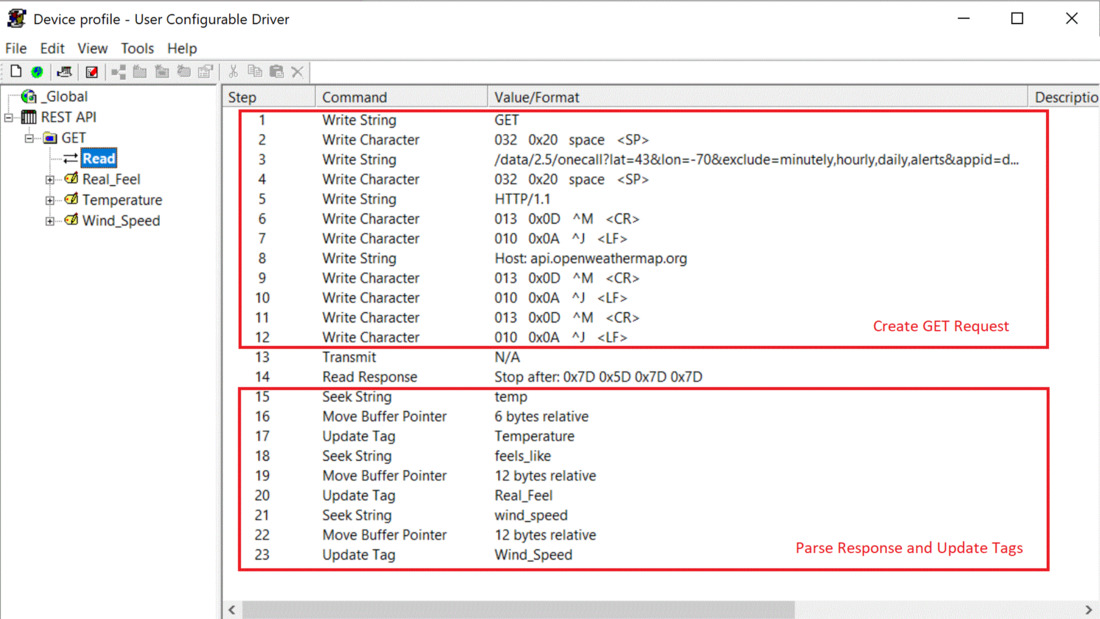
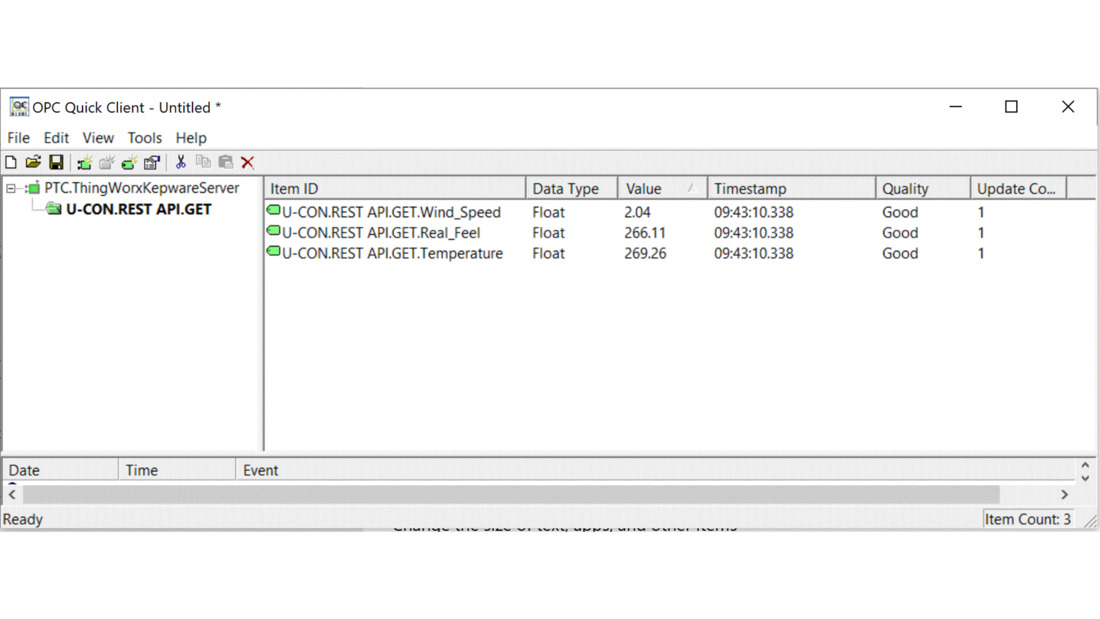
For the sake of the upcoming demonstration, we will be working with the Open Weather Map API located at api.openweathermap.org. This open API provides the ability to issue HTTP GET requests to read weather data for a given area. Here is an example of the HTTP endpoint being accessed by a web browser and the associated payload within the response.
http://api.openweathermap.org/data/2.5/onecall?lat=43.65&lon=70.25&exclude=hourly,daily,minutely&appid={Your app key}
Response:
{
"lat": 43.65,
"lon": -70.25,
"timezone": "America/New_York",
"timezone_offset": -14400,
"current": {
"dt": 1687889314,
"sunrise": 1687856474,
"sunset": 1687911995,
"temp": 294.15,
"feels_like": 294.66,
"pressure": 1009,
"humidity": 90,
"dew_point": 292.45,
"uvi": 1.35,
"clouds": 100,
"visibility": 10000,
"wind_speed": 5.14,
"wind_deg": 160,
"weather": [
{
"id": 804,
"main": "Clouds",
"description": "overcast clouds",
"icon": "04d"
}
]
}
}
在幕后,与其他示例一样,浏览器会将 HTTP GET 请求发送到 API。你可以使用 Wireshark 等网络监控工具找到 GET 请求的结构。在 Wireshark 中,有一个功能使你能够跟踪特定的 TCP 流。换句话说,你可以查看在该 TCP 套接字内发送的所有消息。当跟踪连接的 TCP 流时,GET 请求的轮廓如下:
GET /data/2.5/onecall?lat=43.65&lon=-70.25&exclude=hourly,daily,minutely&appid={my personalized app key} HTTP/1.1
Host: api.openweathermap.org
The HTTP response is as follows:
HTTP/1.1 200 OK
Server: openresty
Date: Tue, 27 Jun 2023 18:21:00 GMT
Content-Type: application/json; charset=utf-8
Content-Length: 393
Connection: keep-alive
X-Cache-Key: /data/2.5/onecall?exclude=hourly,daily,minutely&lat=43.65&lon=-70.25
Access-Control-Allow-Origin: *
Access-Control-Allow-Credentials: true
Access-Control-Allow-Methods: GET, POST
{"lat":43.65,"lon":-70.25,"timezone":"America/New_York","timezone_offset":-14400,"current":{"dt":1687890040,"sunrise":1687856474,"sunset":1687911995,"temp":294.21,"feels_like":294.72,"pressure":1009,"humidity":90,"dew_point":292.51,"uvi":1.35,"clouds":100,"visibility":10000,"wind_speed":5.14,"wind_deg":160,"weather":[{"id":804,"main":"Clouds","description":"overcast clouds","icon":"04d"}]}}
The goal within the Kepware custom driver is to rebuild this exact based HTTP request and to parse the associated response.